

WordPress 6.9 PageSpeed improvements are finally meaningful enough to help site owners pull their Core Web Vitals back into the green. If your PageSpeed scores have been dropping no matter what you try, this update brings real frontend and backend upgrades that actually make a difference.

Are You Tired of Your SEO Guy Panic Texting You About Dropping PageSpeed Scores? WordPress 6.9 PageSpeed Improvements Might Finally Be Your Turning Point.
You know the drill.
Google Search Console fires another warning about Core Web Vitals.
Your SEO person says the words you were dreading again: “We need to fix PageSpeed.”
You open the report and watch the scores sink like they are actively avoiding green.You uninstall some plugins and the score drops.
You swap themes and it still drops.
You yell at your hosting, tweak caching, clear every cache twice, and somehow the site still feels heavy.
WordPress performance can feel confusing if you are not living in dev tools all day. The good news is that WordPress 6.9 actually brings real frontend performance improvements that both users and developers will notice. It improves script loading, CSS behavior, layout stability and some server side details that affect Time To First Byte.
If your site has been stuck in the orange or red zone, this release finally gives us better tools to move toward green.
According to the official field guide, 6.9 includes improvements for scripts, styles, template output buffering, WP Cron timing, Video block layout behavior and RSS caching. Make WordPress
Let’s walk through what changed in a human way, and then drop in code examples so developers can actually use these features.
Smarter Script Loading So Your Page Stops Freezing at the Start
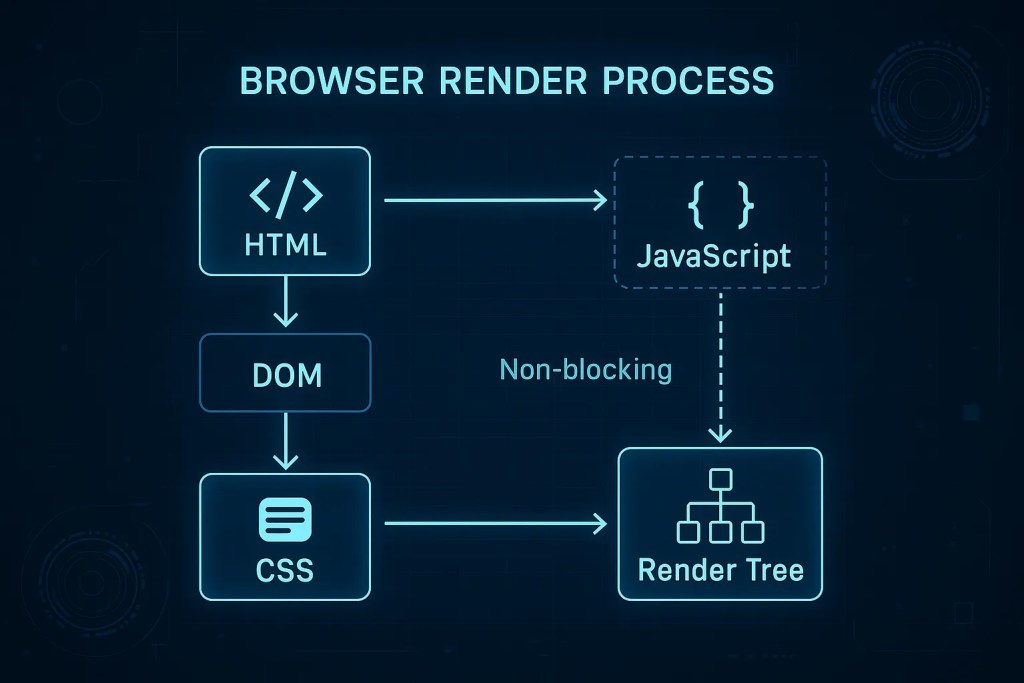
Blank white screens on load usually mean scripts are blocking the browser from painting content. WordPress 6.9 helps here with two things:
- Support for
fetchpriorityon scripts and script modules - The ability to print script modules in the footer instead of the head.
In practical terms, that means you can tell the browser which scripts are less important, and you can push those to the footer so your content loads earlier.
Developer snippet: enqueue a low priority script in the footer
<?php

// Enqueue a script that should not compete with critical content.
wp_enqueue_script(
    'my-frontend-script',
    plugins_url( 'assets/js/frontend.js', __FILE__ ),
    array(),          // No dependencies
    '1.0.0',          // Version
    array(
        'in_footer'     => true,   // Print at wp_footer
        'strategy'      => 'defer',// Defer execution
        'fetchpriority' => 'low',  // Hint browser this is not critical
    )
);
Developer snippet: lower priority of an existing script
<?php
// If a script is already registered or enqueued, adjust its fetchpriority.
wp_script_add_data(
    'my-frontend-script', // Script handle
    'fetchpriority',      // Data key
    'low'                 // auto | low | high
);
Developer snippet: module script in the footer
<?php
// Enqueue a script module and print it in the footer.
wp_enqueue_script_module(
    'my-interactive-module',
    plugins_url( 'assets/js/interactive.js', __FILE__ ),
    array(),          // Module dependencies
    '1.0.0',
    array(
        'in_footer' => true, // Move module output to wp_footer
    )
);
These small tweaks reduce competition for network bandwidth so your largest content element can load earlier.
CSS Gets Leaner So Your Pages Render Faster

CSS is another classic performance villain. Too much of it, or loaded at the wrong time, slows everything down.
WordPress 6.9 improves CSS handling by:
- Raising the inline style limit from about 20 KB to about 40 KB
- Allowing more block theme styles to be minified and inlined
- Loading block styles on demand in classic themes.
In plain language, more of your important CSS can be inlined for first time visitors, and classic themes no longer have to drag the entire wp-block-library CSS on every page.
Developer snippet: customize the inline CSS size limit
If you want to explicitly match the new 40 KB behavior, you can control the inline limit via a filter.
<?php
// Adjust the maximum amount of CSS that can be inlined.
add_filter(
    'styles_inline_size_limit',
    function ( $limit ) {
        // Set limit to 40 KB for better first view performance.
        return 40 * 1024;
    }
);
This is useful if you want to experiment with a slightly lower or higher value for your specific traffic and caching pattern.
Hidden Blocks No Longer Load Useless Assets by Default

Previously, even if a block did not output any markup, its CSS and JavaScript often still loaded. For example, a missing featured image could still cause the Featured Image block styles to appear on the page.
In WordPress 6.9, if a block ends up not rendering anything, the styles and scripts it tried to enqueue are removed. That means less unused CSS and less JavaScript running for no reason.
If your site relies on a hidden block’s assets for some reason, you can re enable them with a filter.
Developer snippet: always keep assets for a specific hidden block
<?php
// Force assets to load even when a block renders no markup.
add_filter(
    'enqueue_empty_block_content_assets',
    function ( $enqueue, $block_name ) {
        // Example: always include Featured Image block styles.
        if ( 'core/post-featured-image' === $block_name ) {
            return true;
        }

        return $enqueue;
    },
    10,
    2
);
Most sites never need this. It is useful only in special layouts that depend on block CSS even when the block is not visible.
Layout Shift Fixes That Help Your CLS Score
Layout jumping is one of the most annoying issues for real users and for Core Web Vitals. In WordPress 6.9, the Video block has been updated so it has proper dimensions and aspect ratio, which avoids sudden jumps when the video or poster image loads.
This is a quiet but very important improvement for sites that embed video in headers, hero sections or above the fold content.
Backend Tweaks That Improve TTFB and Efficiency
Several changes in WordPress 6.9 help behind the scenes too.
- WP Cron now spawns at
shutdowninstead ofinit, which reduces the impact of cron loopback calls on initial page responses. - RSS feed caching has been improved so external feed widgets and similar features make fewer expensive calls.
These changes do not need code from you, but they give you a better baseline to work from.
Classic Themes Get Smarter Block Styles Loading
This one is big for older or classic themes. Previously, they often had to load the full wp-block-library stylesheet because the theme did not know which blocks would appear when the head was printed.
WordPress 6.9 uses a template enhancement output buffer so classic themes can now load separate block styles on demand, then hoist those styles up into the head automatically.
The result is a large CSS reduction for many classic themes, while still avoiding a flash of unstyled content.
If for some reason you really cannot accept the slight TTFB increase caused by the output buffer, there is a way to opt out.
Developer snippet: opt out of separate block assets in classic themes
<?php
// Only disable this if you have carefully tested the impact.
add_action(
    'after_setup_theme',
    function () {
        add_filter( 'should_load_separate_core_block_assets', '__return_false' );
    }
);
Developer snippet: ensure a specific block stylesheet always loads
If your content is not being run through do_blocks, you may occasionally miss block styles and want to force them.
<?php
// Make sure the Video block styles are always present.
add_action(
    'wp_enqueue_scripts',
    function () {
        wp_enqueue_style( 'wp-block-video' );
    }
);
This lets you fine tune blocks that appear in unusual or custom positions.
Emoji Script: Small But Real Gain on Low End Devices

The emoji detection script used to be a small inline blocking script in the head. In 6.9 it becomes an inline script module and moves to the footer, which means it no longer blocks the HTML parser and no longer competes with LCP resources.
If you are very strict about performance, you can still remove the emoji loader entirely.
Developer snippet: remove the emoji detection script
<?php
// Disable the emoji detection script on the frontend.
remove_action( 'wp_head', 'print_emoji_detection_script', 7 );
This is a long running, commonly used optimization that remains valid in 6.9.
So Does WordPress 6.9 Magically Make Your Site Fast?
Not by itself.
It gives you a better engine, not a finished race car.
Your final performance still depends on how everything is configured and tuned:
- Script priority and placement
- CSS trimming and inlining strategy
- Whether block styles are loaded on demand
- Caching and CDN setup
- Plugin and theme quality
- Server response time
- Mobile focused testing
For non technical site owners, the takeaway is simple. 6.9 is a good foundation, but you still need thoughtful optimization on top of it.
For developers, the new flags, filters and loading strategies give much more control over how and when assets load.
This Is Where My WordPress Speed Optimization Service Comes In
I work with both business owners and technical teams who are tired of slow sites and confusing PageSpeed reports. With over twelve years in PHP, JavaScript, themes, plugins and performance tuning, I can take these 6.9 features and turn them into real world speed gains for your site.
I focus on:
- Fixing poor PageSpeed and Core Web Vitals
- Reducing render blocking scripts and styles
- Trimming and restructuring CSS
- Improving TTFB and overall loading behavior
- Cleaning up plugin and theme performance issues
- Making mobile load times feel instant rather than sluggish
WordPress 6.9 finally gives us a better toolkit. Combined with a proper performance audit and tuning process, your site can move from “it eventually loads” to “this actually feels fast.”
Your visitors feel it.
Search engines detect it.
Your SEO reports become calmer.
A fast site is no longer optional. It is one of the clearest competitive advantages you can buy.

Leave a Reply
You must be logged in to post a comment.